
Skip to content
Business-Central-Shipment-Connector-mockup-web
Shipment-connector-microsoft-appsource-icon-xtensionit

Shipment Connector for Transsmart

Automate shipments, track parcels, and handle customs directly in Business Central

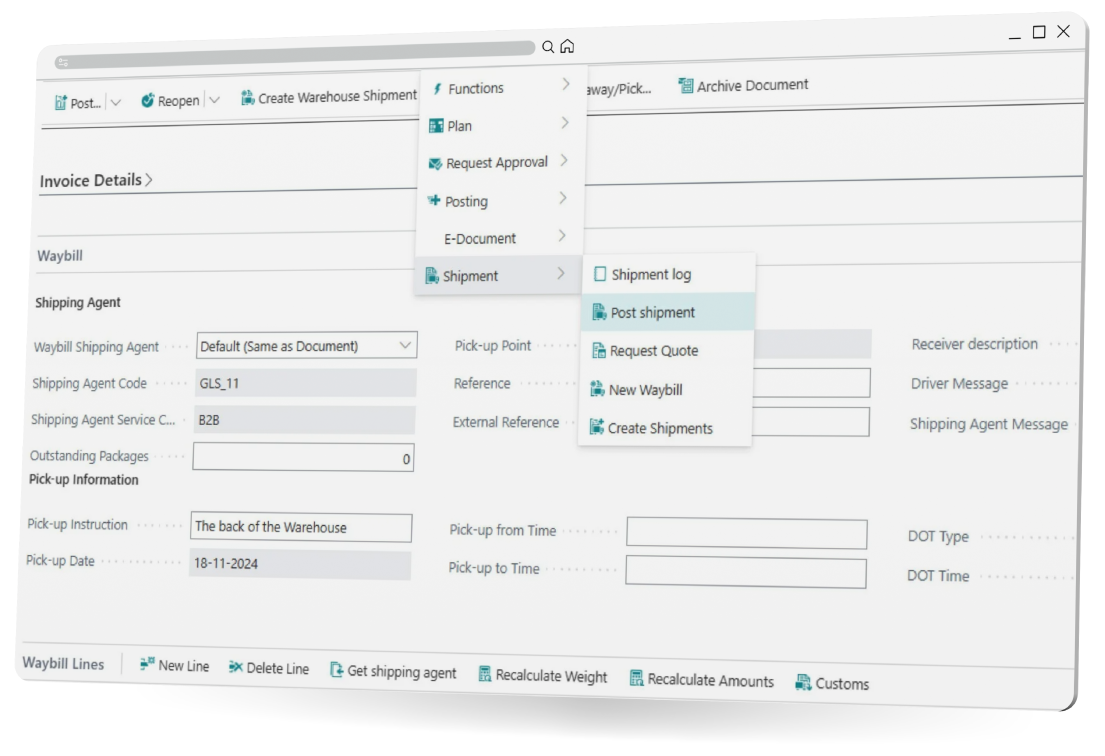
Shipment Connector connects Microsoft Dynamics 365 Business Central with multi-carrier shipment platforms and automate shipping operations.

Shipment Connector handles everything from waybill creation to label printing, track & trace, and customs documentation - eliminating repetitive manual tasks.

Extenders for:
Dangerous Goods handling
Tasklet Factory Mobile WMS Pack&Ship

Productsheet

Read Transsmart Shipment Connector productsheet

Free trial

Download a free trial of Transsmart Shipment Connector

Order here

Get a quote or place an order for Transsmart Shipment Connector

Pricelist

Get an overview of our Shipment Connector packages and prices

CS1_4459

Obtain Group & Embacollage

To create a more efficient, customer-friendly and cost-conscious logistics, Embacollage initiated a close collaboration with Obtain Group and XtensionIT. With the Shipment Connector solution, Business Central and nShift were connected in one unified flow that automates everything from freight rates and shipment data to customer communication. All of this has helped to reduce manual tasks and has provided full cost transparency.
 

Added value

Single point of data entry
Shipment information from order to carrier

Flexible shipment handling
Adjust parcel and carrier details through Warehouse workflows

Track & Trace for Customer Service
Provide Track & Trace and status for Customer Service

Additional functionality
Expand your shipment features in Business Central with additional features. Learn more down below

Functionality

Multi-carrier shipping directly from Business Central
Centralized shipping management for all orders
Automated label creation and tracking updates
Automatic printing of shipping documents
Real-time freight rate comparison
Track & Trace links for customers
Seamless carrier integration via multi-carrier platforms
Simplified return handling and reverse logistics

What is a Transsmart Shipment Connector?

A Shipment Connector is an IT solution designed to automate warehouse processes. Once the Shipment Connector is implemented, it takes over some of the manual tasks that arise when you receive an order. Our Shipment Connector is intelligent in that it automatically generates the shipping label in your Transsmart logistics platform directly from the sales order or warehouse shipment documents in Business Central. Track & Trace information is updated in Business Central, and package labels are sent to the designated label printer.

logo-transsmart-blue-500x300

Shipment Connector additional functionality

Extended booking

Enables booking directly from both warehouse shipments and transfer orders in Business Central. This allows you to plan and register your shipments across multiple locations without leaving the system, saving time, reducing errors, and streamlining your workflow from order to delivery. 

Customs Handling

Enables management of customs processes directly from your shipments in Dynamics 365 Business Central. This allows you to handle all necessary documentation and compliance steps without leaving the system, saving time, reducing errors, and streamlining your workflow from order to delivery. 

Dangerous Goods

Allows you to manage hazardous shipments safely and efficiently within Business Central. You can classify, document, and track dangerous goods directly in the system, ensuring regulatory compliance, minimizing risk, and keeping your shipping process smooth and secure. 

Tasklet Mobile WMS

Tasklet Mobile WMS Extender enables you to process shipments directly from Tasklet Mobile WMS within Business Central. You can pick, pack, and post shipments on the go, ensuring real-time updates, reducing errors, and keeping your warehouse operations efficient and connected. 

FAQ

What is Shipment Connector?

Shipment Connector is a solution that connects Microsoft Dynamics 365 Business Central with multi-carrier shipping platforms like nShift and Shipmondo to automate shipping operations. It can handle tasks such as waybill creation, label printing, track & trace updates, and customs documentation.

How does Shipment Connector work?

Once implemented, Shipment Connector automatically generates shipping labels from sales orders or warehouse shipment documents in Business Central. Track & Trace information is updated in Business Central, and labels are sent to the designated label printer.

What additional functionalities does Shipment Connector provide?

Extended Booking: Allows booking directly from warehouse shipments and transfer orders in Business Central.

Customs Handling: Supports management of customs processes directly from shipments in Business Central.

Dangerous Goods: Enables classification, documentation, and tracking of hazardous shipments in Business Central.

Tasklet Mobile WMS Extender: Enables processing of shipments directly from a mobile WMS, including picking, packing, and posting shipments.

Does Shipment Connector support multi-location operations?

Yes. Extended Booking allows users to plan and register shipments across multiple locations directly within Business Central.

Can Shipment Connector handle customs processes?

Yes. The additional "Customs Handling" functionality enables users to manage necessary customs documentation and compliance steps directly in Business Central.

How does Shipment Connector handle hazardous shipments?

The additional "Dangerous Goods" feature allows classification, documentation, and tracking of hazardous shipments directly in Business Central, supporting compliance and safe handling.

Can shipments be processed using mobile devices?

Yes. The additional feature "Tasklet Mobile WMS Extender" allows warehouse users to pick, pack, and post shipments via mobile WMS, with updates reflected in real time in Business Central.

How is Shipment Connector installed?

Shipment Connector can be downloaded from Microsoft AppSource and installed automatically in Dynamics 365 Business Central.

Is Shipment Connector integrated with Business Central?

Yes. Shipment Connector operates directly within Microsoft Dynamics 365 Business Central.

Jesper-Xtensionit

Jesper Lohse
Consultant